
Karkas · cabinets and kitchens
Every cabinet made to measure. Every part labelled.
Measure the room, build the cabinets. The cut list, part labels, CNC files, the quote and a photoreal render all come from the same project; change one size and they all change with it.
- 0.1 mmcut sizes, edge banding taken off
- PDF · Excel · DXF · DWGnothing extra to install
- Labels + QRthermal printer or A4
- Windows 10 / 11a desktop program, projects stay on your PC

01 Design
Karkas is Turkish for carcass. Every size of it is yours.
Enter the room size and the cabinets line up along the wall; corners and the run of wall units sort themselves out. Sides, bottom, rails, grooved back panel, drawers, fronts and legs: each part is worked out by its own rule. Change one size and every part that depends on it changes too.
- Sides
- Bottom
- Rails
- Back panel (grooved)
- Drawer boxes
- Fronts
- Legs
Design · sizes and fronts
Try it: change a size and watch the cut list follow.
The sums use Karkas's own rules and match the program exactly.
| Part | Qty | Finished | Cut | Banding |
|---|
02 Cut list
The cut list is ready the moment the design is.
Finished size and cut size, the edges to band, grain direction, quantity. The parts are laid out on sheets with as little waste as possible.
| Part | Qty | Finished | Cut | Material | Banding |
|---|
Cut list · labels
Parts don't get mixed up after cutting.
Every part gets a label with its number, size, a banding diagram and a QR code, for a thermal printer (100×50, 80×50) or A4. The label map shows which label goes on which part of each sheet. Labels are shown here as the program prints them, in Turkish.
Point at a label on the sheet to see what it says and its QR code.
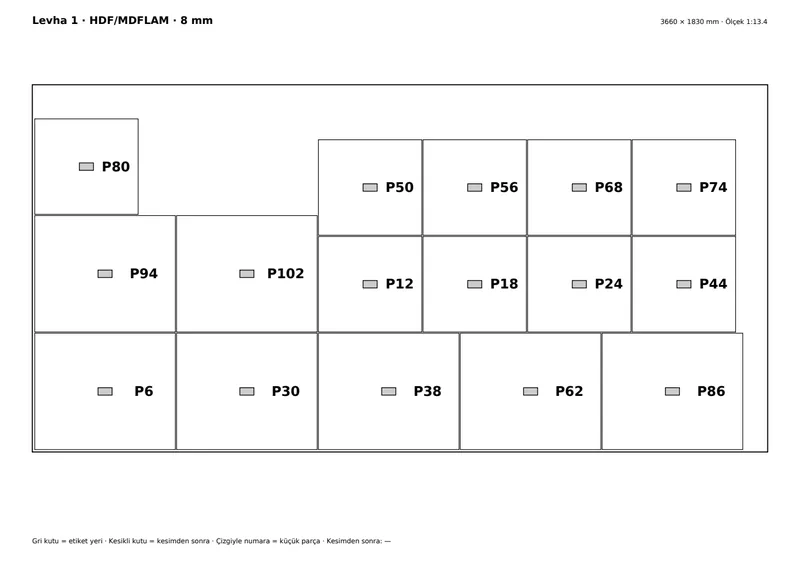 Label map · Sheet 1 · PDF
03 To the shop
DXF for your own CNC, a spreadsheet for your cutting service.
One DXF per sheet, with each kind of work on its own layer. No CNC? One click gives a plain Excel list to load into a panel-cutting service's optimiser. The sheet behind this card is being cut with the real tool path the program wrote for it.
- KONTUR_Z18: part outline
- KANAL_Z8: back-panel groove
- ETIKET: label position
One install · three packages
Cutting and carving shops have a package of their own.
A shop that cuts customers' files or cutting lists (on a CNC router or a panel saw) and a shop that carves panels each start at their own door, without designing a cabinet. A cabinet maker's file means the same thing in all three.
04 For the client
Let your client see the kitchen before it's built.
Same project, same camera. Slide between the design view and the photoreal render. The lighting is part of the program: daylight, evening or a catalogue shot, with nothing else to install.
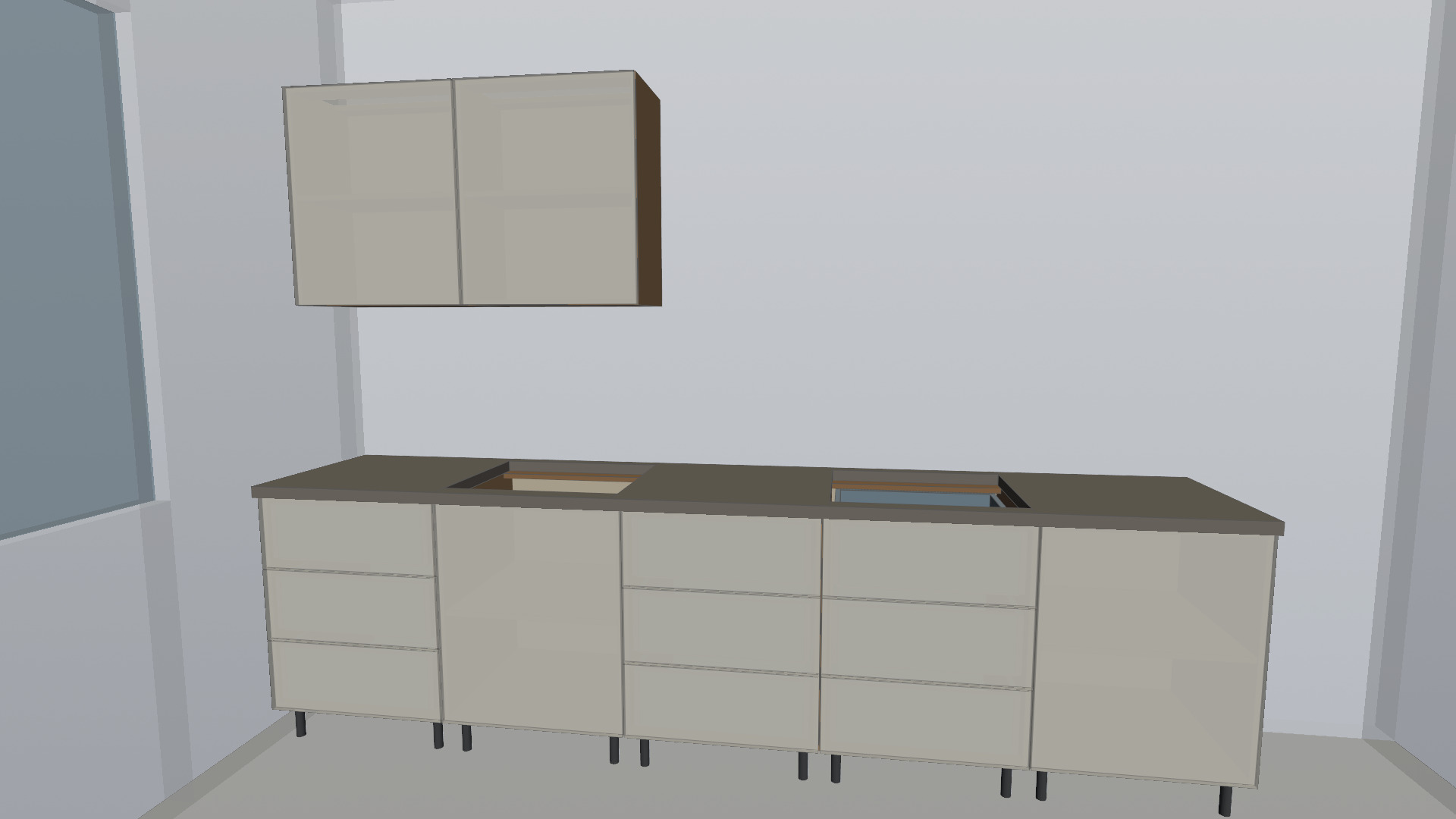
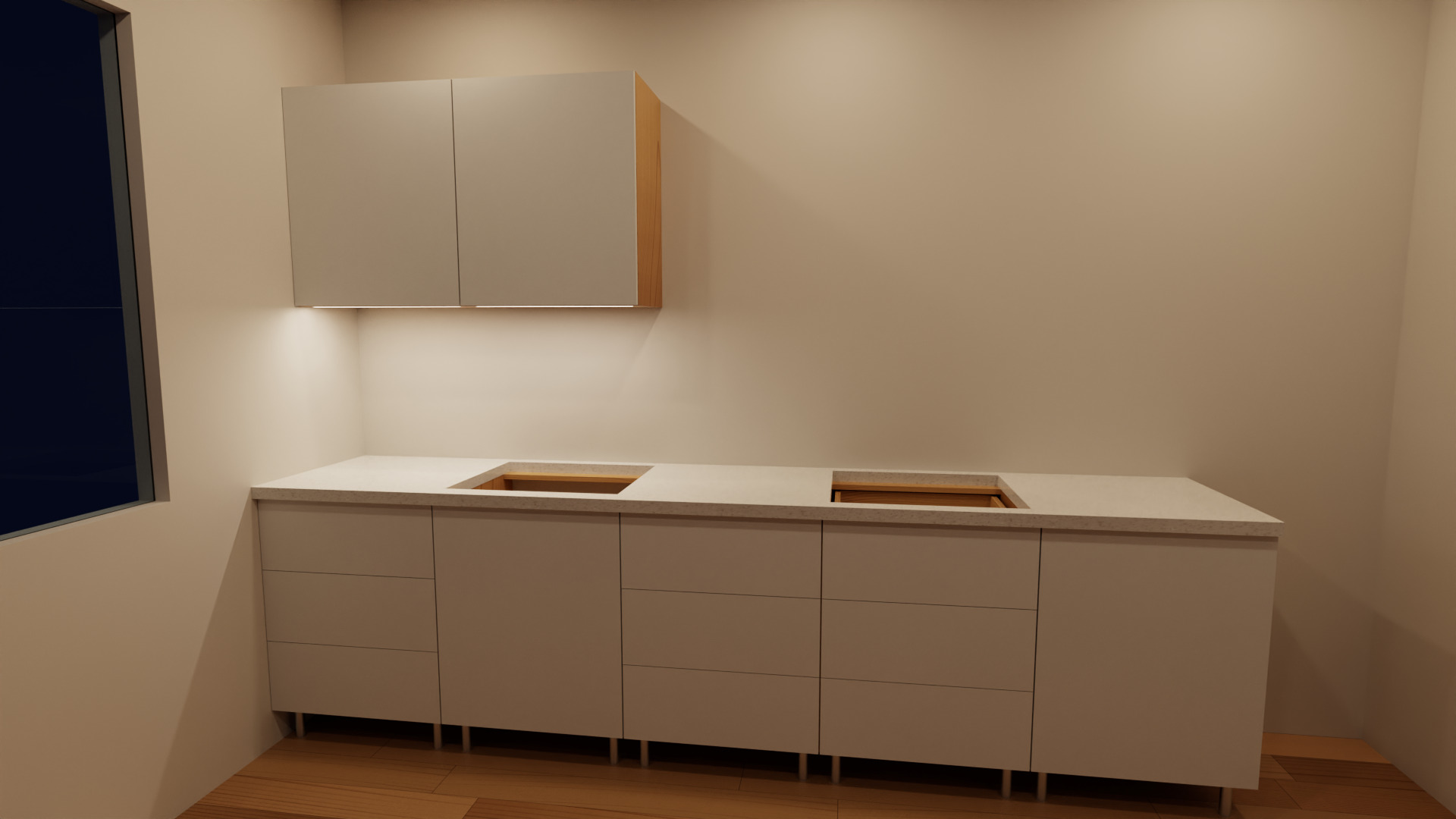
Rendered by Karkas itself. No stock photos.
For the client · dimensioned drawings
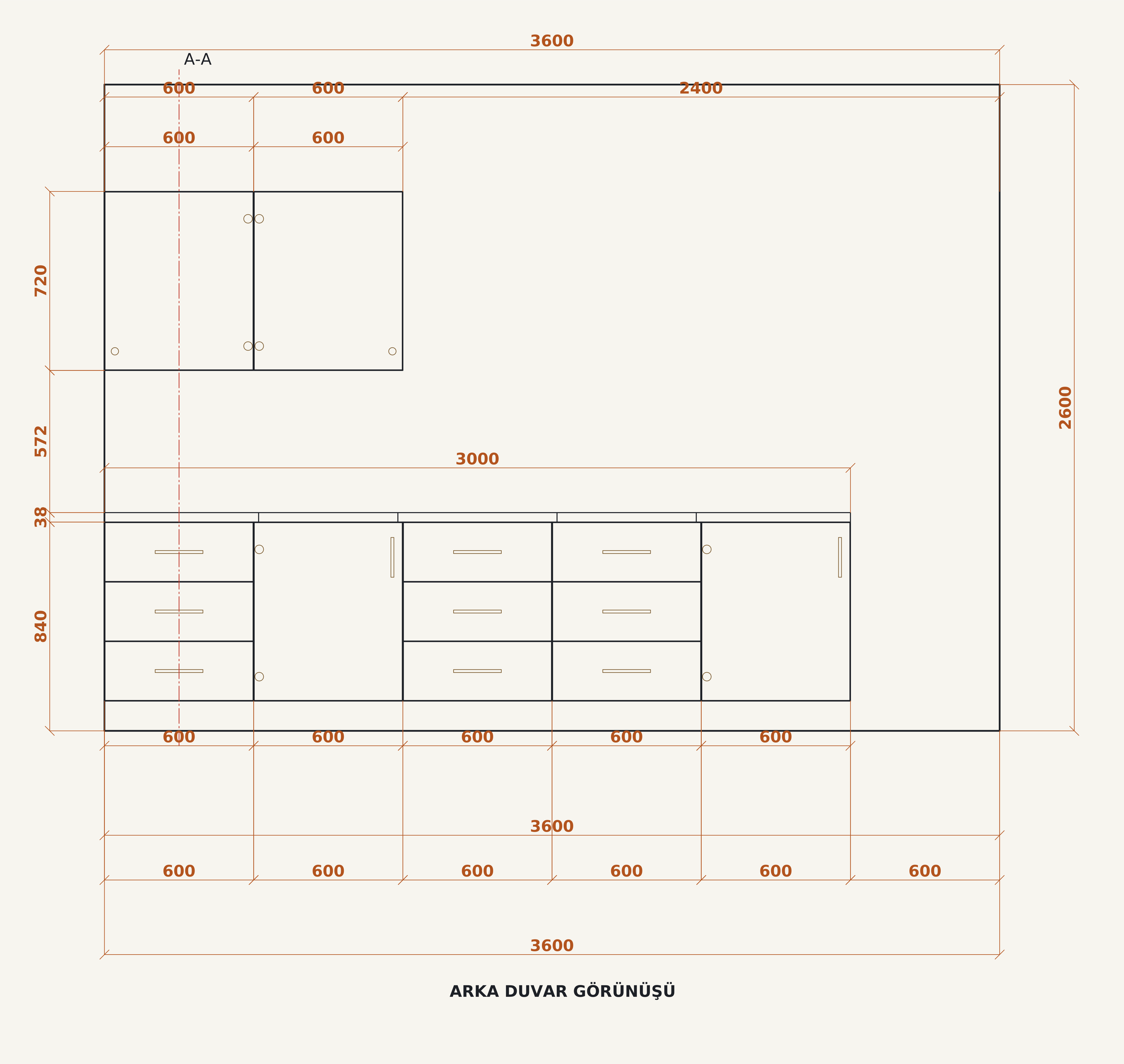
Dimensioned drawings for the shop floor and the client.
Plan, wall elevations and sections come from the cabinets' real sizes. Running dimensions in one click, hatched sections, handles and hinges drawn in. Print it as a PDF, or hand a DWG to AutoCAD.
05 Quote
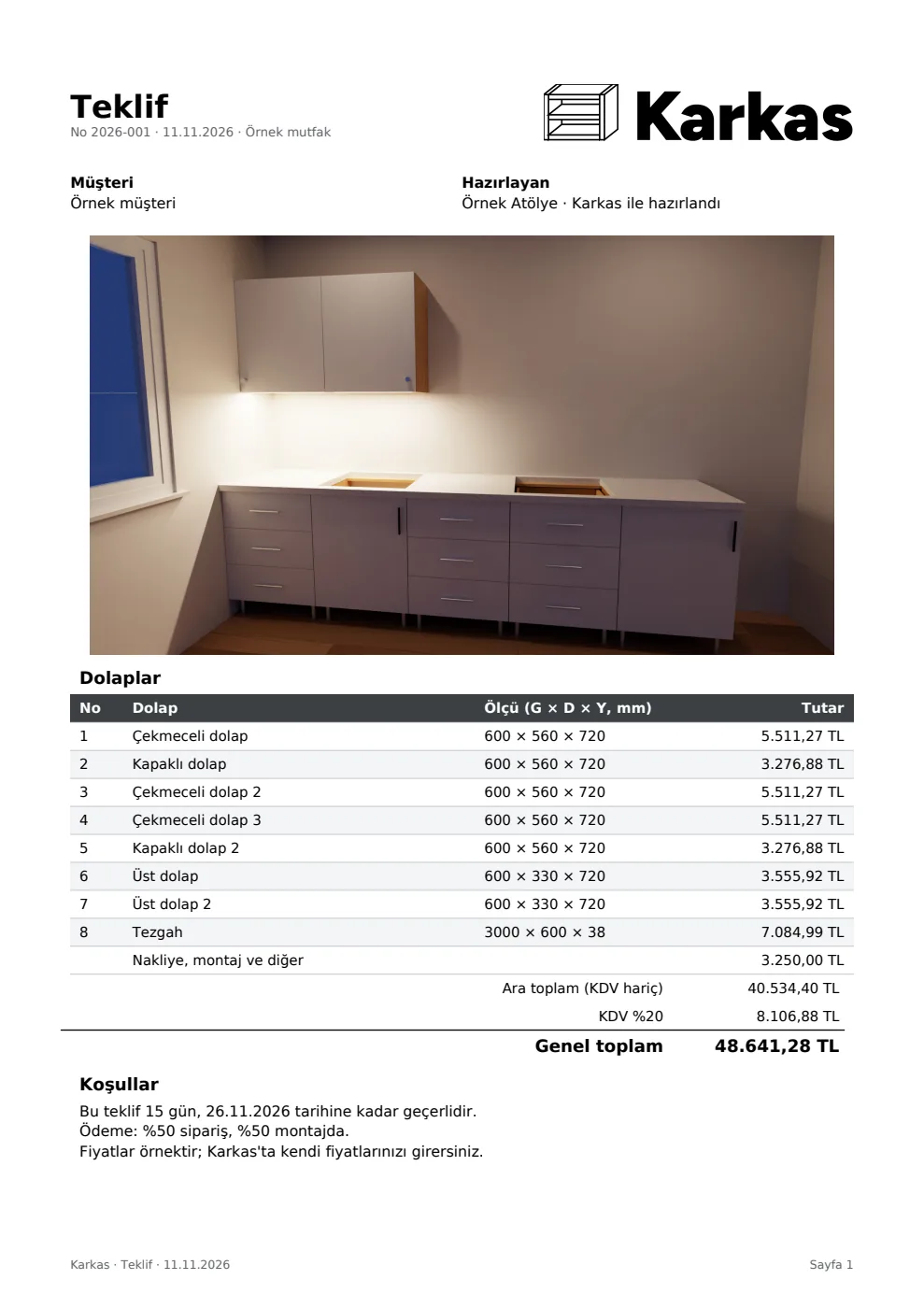
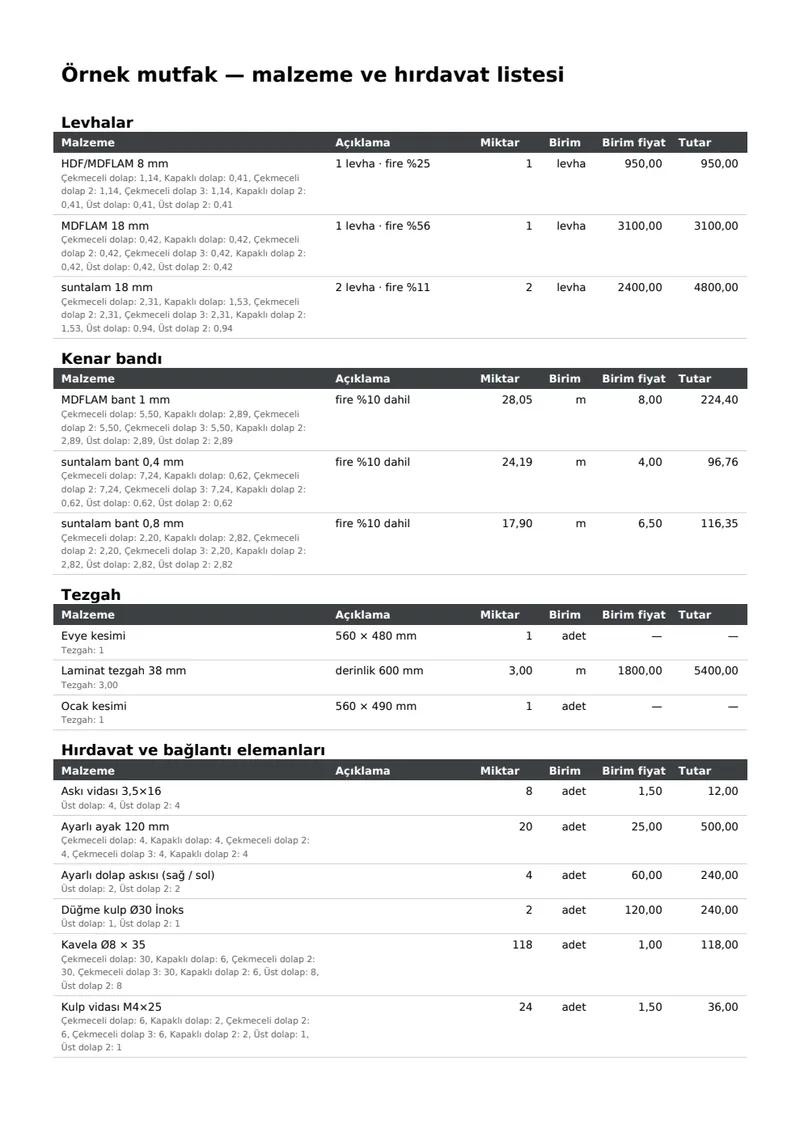
Let the program price the job and list the hardware.
Sheets, edge banding, hardware and labour come from the same project; add your margin and VAT, and a quote with your logo goes to the client. Hinges, runners, cam fittings, dowels, shelf pins and legs are listed cabinet by cabinet with their counts, and the counts come from the holes that get drilled.
The prices in this sample are for illustration, in Turkish lira. A shop uses its own price list.
Features
A few more things.
Four things the story above doesn't show, and that help every day.
- AutoCAD files
- Opens and saves DWG and DXF itself; there is nothing else to install.
- Doors and hinges
- Hinge side and positions are set for you, lift-up doors included; open and close the doors to check.
- Design check
- A front edge with no banding, a part too big for the sheet, a gap too narrow: you get a warning before anything goes to production.
- Autosave
- A power cut doesn't lose your work: the program offers to recover it when it opens again.
Real outputs
The sample kitchen's files. Open them, look, download.
The kitchen on this page was built in Karkas, and these are the files the program made for it, exactly as it wrote them: their text is in Turkish.

Questions
Frequently asked
I don't have a CNC. Is it any use to me?
Yes. The cutting-service spreadsheet is a plain list to load into a panel-cutting service's optimiser, and with the labels the parts don't get mixed up after cutting.
Does it work in millimetres?
Yes. Every size, cut list and file is in millimetres, with cut sizes rounded to 0.1 mm.
Can it open my AutoCAD drawings?
Yes. Karkas opens and saves DWG and DXF itself; you don't need AutoCAD or a converter on the same computer.
Where is my data kept?
Your projects stay on your own computer, as .karkas files. The program saves as you work and offers to recover your work after an unexpected shutdown.
How many computers can I use it on?
A licence is tied to a set number of computers. When you change computers, you deactivate the old one from inside the program and activate the new one. A workshop package covers several computers.
Early access
Hear first when Karkas is in English.
Karkas is in closed beta with workshops in Turkey, and its interface, labels and documents are in Turkish today. An English version is being built. Leave your email and we will write to you when it is ready to try; feedback from your shop will help shape it.
- System
- Windows 10 / 11, 64-bit
- Memory
- 8 GB (16 GB recommended for rendering)